
Legacy Tree – GEDCOM Family Tree Printing Software for Windows
Turn your existing genealogy research into a family tree you can explore, personalise and print.
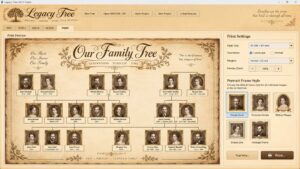
Legacy Tree is GEDCOM family tree printing software for Windows, designed for people who already have family-history data and want a better way to see it, organise it and turn it into an attractive printable family tree.
Import an existing GEDCOM file, explore ancestors and descendants, add family photographs, focus on individual branches or geographical areas and prepare your family tree for printing.
You have already done the hard work researching your family.
Legacy Tree helps you turn that research into something worth keeping.
AVALIBLE VERY SOON
– Buy Once. Own For Life Software –
Import Your Existing Family Tree From a GEDCOM File
There should be no need to type hundreds of names back into another program simply because you want to create a better family-tree print.
Legacy Tree is built around GEDCOM import.
GEDCOM is the standard file format used for transferring genealogical information between family-history applications and services.
Export your existing family tree as a .ged file and open it in Legacy Tree.
The software can then use the relationships contained within your genealogy data to construct a visual family tree.
This makes Legacy Tree particularly useful for anyone searching for a way to:
Print a family tree from a GEDCOM file, create a visual tree from existing genealogy research, or move family information into dedicated family tree printing software.
Family Tree Software Designed Around Printing
Many genealogy applications are primarily designed for research, databases and historical records.
Legacy Tree takes a different approach.
Its focus is on what happens after you have collected the information.
Instead of treating printing as an afterthought, Legacy Tree is being developed around visualisation, layout and presentation.
You can use your existing genealogy data to create trees suitable for:
- Family archives
- Framed family trees
- Gifts for relatives
- Family reunions
- Genealogy research
- Historical displays
- Family-history projects
- Printed records for future generations
The aim is to make printing a family tree from GEDCOM data straightforward without requiring you to rebuild your genealogy manually.
Explore the Whole Family or Concentrate on One Branch
Large family trees quickly become complicated.
Sometimes you want to see the entire family.
At other times, you may only want one person’s ancestors, descendants or immediate relatives.
Legacy Tree provides different ways of exploring your genealogy, including:
Whole Tree View
Explore the wider family structure.
Ancestors and Descendants
Concentrate on generations connected with a particular person.
Immediate Family View
Focus on close family relationships.
Find Person
Locate an individual within a large imported family tree.
This becomes particularly valuable with GEDCOM files containing hundreds of people.
Rather than staring at an enormous wall of names, you can concentrate on the part of your family’s story that matters.
Find Your Family by Location
Legacy Tree also lets you explore genealogy in a different way:
by place.
Family-history records often contain birthplaces and other geographical information stretching across counties, regions and countries.
Legacy Tree’s location filtering allows you to select an area and concentrate on family members connected with that location.
For example, your genealogy might contain branches connected with:
Canada
Lancashire
Scotland
Wales
London
or any number of other recorded places.
Instead of only asking:
“Who were my ancestors?”
you can begin exploring:
“Which members of my family came from here?”
A location-filtered tree can also be prepared for printing, making it possible to create specialised family-history charts around a county, town or family migration route.
Add Family Photographs and Portraits
A family tree becomes considerably more interesting when the people stop being anonymous boxes.
Legacy Tree allows portraits to be associated with individual family members and displayed as part of the tree.
Different portrait-frame styles can be selected, including understated designs and more ornate traditional or heraldic frames.
This allows you to combine genealogical information with surviving family photographs and create a tree that feels much more like a family archive.
Names and dates provide the record.
Faces bring it back to life.
Create Attractive Printable Family Trees
Legacy Tree is not restricted to plain database-style diagrams.
Presentation is an important part of the software.
Family trees can incorporate visual features such as:
- Family portraits
- Decorative portrait frames
- Nameplates
- Genealogy connector lines
- Family crests
- Decorative headers
- Traditional backgrounds
- Aged-paper and parchment-style presentation
- Different tree views and layouts
This gives you considerable freedom over whether the finished result looks clean and modern or more like a traditional historical family document.
GEDCOM Family Tree Printing Without Rebuilding Your Research
One of the main reasons Legacy Tree exists is simple.
People can spend years creating a genealogy.
That work may already exist in another family-history program or online service.
If that information can be exported in GEDCOM format, you should not have to begin again simply because you want a different printable family tree.
Legacy Tree is intended to sit alongside your existing research tools.
Use whichever genealogy service or program you prefer for discovering and recording your ancestors.
Then bring the resulting GEDCOM into Legacy Tree when you want to visualise, arrange and print your family tree.
Designed for Larger Family Trees
Real family histories don’t stay small for long.
A few generations can quickly turn into hundreds of individuals.
Legacy Tree has therefore been developed with larger genealogy files in mind.
Its interface includes navigation, searching and data-loading systems intended to keep substantial family trees practical to work with.
Rather than treating a 500 or 1,000-person GEDCOM as one enormous static diagram, Legacy Tree allows you to navigate and concentrate on the people and branches you actually want to see.
Keep Your Family History on Your Own Computer
Legacy Tree is a Windows desktop application.
Your genealogy can therefore be worked with locally rather than requiring your family tree to exist purely as an online service.
For family historians who already maintain their own GEDCOM archives, this provides another practical tool for viewing and presenting that information.
From GEDCOM File to Printed Family Tree
The basic Legacy Tree workflow is deliberately straightforward:
- Export your existing genealogy as a GEDCOM file.
- Import the GEDCOM into Legacy Tree.
- Select the people, generations, branch or location you want to explore.
- Add or organise photographs and presentation elements.
- Prepare the family-tree layout.
- Print the resulting family tree.
If you are new to GEDCOM files, we have also prepared a separate guide:
How to Print a Family Tree From a GEDCOM File
Our step-by-step guide explains what a GEDCOM file is, how to export your existing genealogy and how it can be turned into a printable family tree.
READ: HOW TO PRINT A FAMILY TREE FROM A GEDCOM FILE
Legacy Tree Features
Legacy Tree includes or is being developed around:
- GEDCOM family-tree import
- Printable family-tree layouts
- Whole-tree viewing
- Ancestor views
- Descendant views
- Immediate-family views
- Find-person search
- Family portraits
- Multiple portrait-frame designs
- Location-based genealogy filtering
- County and regional family-history views
- Zoomable family-tree workspace
- Canvas navigation
- Family crests
- Decorative headers
- Background and paper styles
- Large-family-tree support
- Family-history presentation and publishing tools
A Family Tree Is More Than a Database
Genealogy programs are extremely good at preserving information.
But your descendants probably aren’t going to gather around a GEDCOM file.
A printed family tree gives that information form.
Names become generations.
Locations become journeys.
Photographs become people again.
And a database containing decades of family research becomes something that can be put on a wall, handed to a child or preserved with the family records.
That is what Legacy Tree is being built to do.
Turn genealogy data into family history you can actually see.
[DISCOVER LEGACY TREE]
Frequently Asked Questions
What is GEDCOM family tree printing software?
GEDCOM family tree printing software takes genealogical information stored in a GEDCOM file and uses it to create visual family-tree layouts that can be prepared for printing.
Can Legacy Tree import an existing GEDCOM file?
Yes. GEDCOM import is one of the core functions around which Legacy Tree has been developed.
Can I print a family tree exported from Ancestry?
If your genealogy service allows you to export an appropriate GEDCOM file, Legacy Tree is designed to import GEDCOM genealogy rather than requiring the family to be entered again manually.
Can I add photographs to my family tree?
Yes. Legacy Tree supports portraits associated with family members and provides different frame styles for presentation.
Can I print only one branch of my family?
Legacy Tree provides focused tree views so you can work with selected areas of a larger genealogy rather than always displaying the entire database.
Can I find family members by location?
Yes. Location-based filtering is one of Legacy Tree’s more unusual features, allowing genealogy to be explored according to recorded places as well as family relationships.
Is Legacy Tree an online genealogy service?
No. Legacy Tree is Windows family-tree software intended to work with genealogy you already have rather than replacing online historical-record research services.
Copyright © 2012–2026 Radionics Software. All rights reserved.